2020-12-29

The Last Post

Our university sold Monteboo during this year; 2020 has been last year in seventy history of Monteoo observatory.

This blog is on the end, following the shutdown, at least symbolically. Don't expect any additional posts here.

All stuff has been moved to the place:

2015-01-05

Photon Calibration Release

The direction of developing of Munipack during last half-year has been strongly influenced by application of Munipack on data archive in Ondřejov Observatory. I had developing a set of scripts which are suitable for processing of large archives of frames: Astromill. Currently, Astromill is prepared for the particular case, but I plan more general utility, at least for peoples having good grasp in computer programming.

Developing of Astromill contributes tree new important features into Munipack:

Photometry Calibration

The very precise calibration of the Ondřejov archive leaded to deep improvements in the calibration. The maximum precision can be only reached when colour calibration is carefully prepared, which me forced, to construct own catalogue for observed fields because there is no a photometry catalogue which covers all the sky with required precision.

An impact of (un)precise of various calibration methods may be illustrated on light curves, all night observation, which I prepared for new version of light curves tutorial. The best results are achieved by the way:
  • (approximate) calibration of a carefully selected reference frame against to a catalogue (standard field stars) in absolute fluxes.
  • And follow up calibration of all other frames against to the reference.
Much better results can be reached with construction of own catalogue from all frames. It is challenge for me. Preliminary version is implemented in AstroMill. It averages frames and corrects colour extinction. Unfortunately, Munipack is not offer such tool for the task now.

Flat-fields

I've very sad news. All flat-fields which has been generated by flat utility were wrong. At least, they was been imprecise.

All the previous implementations used only robust averaging of the frames with scaling. Both the average mean and the dispersion were scaled independently. It's important for series of twilight shots.

I developed a new algorithm which scales only levels because dispersion is scaled together (thanks to property of photon noise) for known gain. Flat-fields are constructed in two steps:
  • averaged flat,
  • new scaling against to the flat and new averaging.
The precision is order of 1/1000 and as the side effect, gain can be estimated during the process.

Packages Repository

Thanks to official availability of wxWidgets in version 3.0 since June 2014 (link), and including of the wxWidgets libraries in ordinary releases of Ubuntu and Fedora, I updated build scripts for preparation of DEB and RPM packages. So the bundle installation way is not more required (and is obsolete now) and the standard way for installation of packages is supported and recommended. There is nothing to block including of Munipack into main GNU/Linux distributions, I hope.

Also I prepared own repositories for Ubuntu and Debian enabling easy installation and automatics system updates.

2014-04-01

Nights Without Convergence

I spend many sleepless nights during preparation of last release of Munipack when no convergence occurred up to morning blue hours. The new feature, which I developed, was improvement of the robust algorithms which implements join estimation of location and scale parameters of statistical distributions.

With a presumption of Normal (Gaussian) distribution of data, the location parameter (centre of distribution) is independent on its scale and moreover, the estimate of the scale by conventional methods (standard deviation, mean of absolute deviations) is optional and naturally guaranties minimal noise and maximal information. Processing of data with other distributions, which we are supposing when robust algorithms are applied, also requires estimate of its scale (standard deviation) of the distribution together with the location.

From numerical mathematics point of view, this is a standard task. One can use the method of maximum likelihood, the likelihood function will be constructed and its minimum is determined to get parameters. Another standard way is to derive a gradient of the function and use an appropriate numerical library to locate minimum from an initial estimate.

Unfortunately, I revealed during the sleepless nights, that the gradient way can fail when the original function is not quadratic (opposite to the least square method). In this case, the false (artificial) features are appearing and I spend nights by looking for its convergence criterion.

Square of gradient of the function

The final result, on figures, is self-describing. When initial estimate of the gradient method falls inside of pit, on the left from the artificial throat, a method converges. When we are starting on the right, the algorithm is non-convergent or with minimum in infinity.

Negative logarithm of maximum likelihood function

A non-gradient method without derivatives locates the minimum easy and unique (and unfortunately slowly).

As the result of all the sleepless nights, users of Munipack benefits in less scattered estimates of averaged biases, darks, flats, sky backgrounds, photometry calibrations,…


Closing doors


I'm closing Munipack's site on Google Code because separation on development and stable sites was source of confusing for many users. The content of wiki has been merged to main site and Mercurial repositories will be sometimes updated.

Together with the change, I thinking also about closing of mailing lists and Google plus page which are practically abandoned.

2013-07-31

Photon Rain

I am pleased to announce the availability of next release of Munipack. This release is 0.5.4 and named Photon Rain because I developed the implementation of the photometric calibration which satisfy my wet dreams for the first time.

The developed implementation along with the new matching algorithm are superseding importantly of Classical release.

The implemented features are two extremely difficult tasks:
  • transformation between photometric systems
  • full photometric calibration
Even more, the fundamental quantity used for calibration are photons (magnitudes has been omitted). The photon approach enable us use of amazing properties of both Poisson's and robust statistics.

The calibration implements all single-filter calibration against to a catalogue and the multi-filter simultaneous calibration with the photometric system transformation matrix. Also the photometric system transformation can be easy determined from observations. Magnitudes are implemented just for compatibility.


Photometry enhancements

Developed a new approach to photometry reductions on base of observed counts and expected photons. Using of basic of Poisson's statistics and added statistical robustness.

Implemented calibrations of single-filter observations along with multi-filter case. The photometry system transformation is developed.

For Details, see Photometry Overview.


Astrometry enhancements

Astrometry is also important part of enhancements.
  • Removed superfluous loops (speed-up about 100x), matching has additional criterion for similarity of observed counts and expected photons (improve robustness in crowded fields where stars can be easy interchanged, also reduces back-tracking tree and therefore importantly improve the algorithm speed).   The computing of   angle between stars in normal space is included as an independent quality test. The star sequences are closed paths now to reduce length of sequences and improve robustness.
  • UCAC4 is now default astrometry catalogue.
  • Proper motion is introduced.
  • Just stars with valid aperture photometry are used for matching (all detected sources had been used and the approach may produce a lot of garbage for improperly corrected images).

Other enhancements

The release includes also these enhancements:
  • Developed a new approach for frame photometry pre-corrections (bias, dark, flat). Renamed (and redesigned) modules for the corrections. A single command  for the corrections (replacing darkbat and flatbat) has been introduced.  It is implemented possibility of masking of a part of image.
  • Basic FITS header modifications are implemented including to update of header's  keywords. A FITS file can be dumped to a text file and restored again (useful to create of tables).
  • Internal FITS tables has different column naming schema to be more compatible with Virtual Observatory conventions. Also some command-line options has been modified for that reasons.
  • For known data sources, the long options (--col-ra, --col-mag ..) has default values and ones can be provided optionally.
  • Structure of both FITS tables and extensions has been changed drastically  and any older preprocessed data are no more compatible (!) with files produced by this version.
  • Building system - Building scripts (in dist/) has been improved to separate the installation to independent bundles (packages) and as the system-wide   one. There is also possibility to install Munipack without wxWidgets.
  • Developed light-curve (or any quantity) time series FITS-flavor format as a simpler version of SimpleTimeseries.
  • GUI updated to match modern desktop conventions (for GNOME 3/ Gtk 3+).
  • Huge expansion of documentation.


Corrected problems:
  • using of shell-environment variable containing substring DATE-OBS
  • A negative declination is recognised as a number (not as a command-line   confusing switch).


Known Issues:
  • GUI has only minor improvements (=practically none).
  • None from New features has no support in GUI (except new photometric quantities box in side panel of View).
  • There are problems with non-English locales. Numbers with commas (replacing dots) are still recognised unsatisfactory (the behaviour is perhaps random and very difficult for testing by myself).


Warning (!)

Many, really many, changes has been prepared against to previous releases. Please, check carefully every self-evident presumption about usage, command-line parameters or data formats.

2012-12-25

Astronomy HDR still in its infancy

It was a nice evening, clear sky and new 10cm refractor was ready for me at Vyškov's observatory. I've always been fascinated by earthshine (Earth's reflected light) and the evening has been ideal for my project: acquire a high dynamic range (HDR) image of Moon including earthshine. Unfortunately, the earthshine is very difficult to record and to display due to enormous intensity range between light and dark parts (which is about one thousand).

Softening contrast

 I've currently experience with using global mapping methods which non-linearly compress high to low ranges. When, we defines contrast as ratio of intensity of a detail against to a local mean, the contrast is compressed together with intensity. As result of the compression, pictures has characteristically softened details. 

Perhaps our perceive prefers the contrast over global luminance, the main problem of HDR photography is compress of the global luminance while preserving the local contrast.

Luminance HDR

During last summer, I've spend some time with algorithms for rendering HDR images. The project which I've been studied deeply is Luminance HDR. Advanced algorithms included in the package works well (at least acceptable) on both normal (landscapes, interiors or erotic photographs, etc) and astronomical scenes.

Earthshine

The algorithm for taking photos has been:
  • I taken set of exposures with different exposure times to cover full range of intensities. I'm preferring division by two sequence: 16,8,4,..  1/32,1/64... For long-exposure night scenes and high ISOs, darks are necessary.
The processing has parts:

  • ll images are unified on same exposure time. Images are spatially (angular) arranged and composed by weighting summation. Weights are choose as a function with maximum in half saturation range and zero outside the range (pfscalibration).
  • The tone mapping maps HDR to a limited range. The package offers many methods, but for my requirements, the just "A Perceptual Framework for Contrast Processing of High Dynamic Range Images" by Rafał Mantiuk, Karol Myszkowski, Hans-Peter Seidel is acceptable (source).


Images

Images of Moon and earthshine has been taken on Oct 20 2012, about 17h UT by Canon EOS 60D (ISO 400). 15 exposures from 32 to 1/64 sec per factor  two. Near horizon, in primary focus of 10cm refractor, Medium seeing, light mist. Approximate ratio of dark and light 1:1000.


Near MonteBoo observatory, superior night in Brno. 32,16,8...1/512,1/1024 s, fish-eye, Canon EOS 60D (ISO 640), ratio 1:2000.

My office. Canon Powershot S90 (ISO 80): 2, 1/2, 1/8, 1/32, 1/128, 1/512 s. Ratio 1:1000.

Český ráj, sandstone cliffs. Canon Powershot S90 (ISO 80):  1/25, 1/60, 1/200, 1/1600 s. Ratio 1:60.


Conclusions

Although, the images at day-light conditions are very nice,
there are some open problems:
  • Some aureole, worse contrast and lower resolutions are visible. I'm meaning ones are products of too-rough  arranging (needs better subpixels). Note that all images are published in two- or tree-times binning.
  • I've worry about correct showing of really full range, single exposures shows even more details.
  • Also many defect (black areas in clouds, purple in dark exposures) are corrupting visually images.
  • I've no ideas about better intensity profile (just gamma is used).
  • The best rendering algorithm is Mantinuk's. Acceptable results gives  also Fattal (both removes gradients). All others, including Gaussian blurring, practically works on base of global methods and gives poor results in contrast.
  • The night exposures are even worse, probably growing noticed defects.
  • As the best rendering, I'm supposing images which are visually indistinguishable against to original scene (by my eye). Various strongly-coloring pictures looks cool, but ones are out of my interest.

Why, an astronomical CCD image is missing? Because there is no converter FITS -> EXR (HDR). :)

Using of the HDR algorithms on astronomical pictures is my future goal.

Many thanks for Fantom, who focused me on qtpfsgui (as  the start point).

2012-10-06

New Photo Preprocessing

This year St. Václav's day and long weekend I dedicated to develop a new approach to a photometric preprocessing in Munipack. My body had treated from flu and cold so I spend a long time at terminal.

As the photometric preprocessing I means photometric corrections:
  • correction for dark current (dark frame),
  • removing of preamplifier offset (bias),
  • correct a variable light response of (CCD) detector together with whole optical system (flat-field).
Munipack's older approach on the corrections has roots in '90, when we acquired dark frames for every exposure time. The bias is included in both scientific and dark exposure and the bias correction is naturally included in boths. The same approach is valid for both scientific and flat frames.

New approach is modeled as following the widely reccomended method in today. A photometrically corrected image Icij is computed for every input image Iij as
  Icij = (Iij - t Dij - Bij) / fij,
where i,j is an index of a pixel, Dij is a dark frame t is ratio of exposure times  of I and  D. Bij is the bias and fij is normalized flat-field frame (to save absolute photometric fluxes):
  fij = Fij / 〈Fij〉.
〈Fij〉 means averaged level determined by robust mean.

I think the change does not cause any controversy. More over:
  • The older approach is still available when bias is treated as zero.
  • From previous point of view, the approach is just primary a new façade for users. More easy user's usage.
  • User is not confused. The method is exactly the same as textbooks describes.
  • Important parts of algorithms are the same, changes in functional parts are minor.
  • Observation time save. A long-exposure dark would be prepared and applied to all shortest exposures (also on longer ones, but the noise can devalue frames).
  • Bias exposures are very short, so acquisition of a lot of biases it is not too time consuming.
  • Processing tools has improvements in use of previous data products and no temporary reduction of frames are created.
This is practically a complete new implementation of preprocessing routines. Of course, all my previous experiences are also included. The work is currently uploaded to Mercurial repository and will be available in a first issued public release.

2012-06-28

New Generation Release

I finished modernization of Munipack the engine during this spring. By the way, the incoming release fully replaces of the classic edition 2009. All the functionality is recovered again (and many many other is added).

All the current functionality has origin in all-inclusive representation of FITS (images has added all processed data as the additional HDU). On the base I prepared new versions of:

  • astrometry,
  • photometry,
  • listing of data (star catalogues, light curves),
  • composition of images.

The classic edition tagged as 0.4.2 is to be supposed obsolete now and its functionality is fully superseded.

Now, Munipack is prepared as to be suitable for regular data processing since this release. Please be careful, really extensive testing is still necessary!

Many of the implemented features has GUI unfinished (unprepared).


Astrometry

Astrometry part has been improved in many points:

  • advanced GUI dialog,
  • batch GUI dialog,
  • the matching has been theoretically studied and the algorithm is practically developed from scratch,
  • the robust fitting part has been improved by more simplifying and fine tuning of the algorithm,
  • GUI contains visualization of matching:

Robust Algorithm

Very important improvement is included in the robust algorithm, the core of all robust estimation. Since this release, I used estimate of median by a fast algorithm by Dijskra (see Wirth (1976)) which can get n/2-th element of n sequence. One is excellent for many data (over twenty) but the ignorance of the correct definition of median (which is mean for even) has poor impact on estimate in case of a few points.

The algorithm of median (scatter) estimation is newly modified. For a few points, the median is estimated using of a sorted sequence (with sorting ~n*log(n) complexity) and the definition. For many points, the algorithm is unchanged and by using of the fast algorithm (with ~n complexity).

Results seems more precise and stable.


Localization

There is an unsolved problem with localization. Many my colleagues has installed localized version of a GNU/Linux distribution which is confused by a decimal dash (no decimal point) in real numbers so the underlying software (wxWidgets) must use locale rules to convert numbers to the right format. So I prepared a (untested) code to be locale-friendly.

Unfortunately, there is no complete solution of the problem. There are many examples where the points must be left: VO related and FITS header must contains only ASCII characters.

Other changes:

  • HTML documentation updated to HTML5,
  • Docs has been restructured and extended for description of completed features and tutorials,
  • Helping utilities konve and picko has been removed from main tree and are available as independent applications (but included to binary version),
  • backup strategy replaces FITS conventions and implements the standard GNU backup behavior,
  • better processing of output filenames in batch,
  • improvement and bugfix in displaying of images,
  • created a photometry GUI dialog,
  • rewrite of munilist (added listing of all objects,..) and kombine (works with spherical coordinates which enable geometrical transformations and mosaicking),
  • updated for a new versions of g++/gfortran and wxWidgets,
  • patchelf utility needed for binary distribution has been fully replaced by -rpath option,
  • clarified verbose/pipelog prints.

Summer Plans:

  • update GUI + add GUI for remaining features,
  • a library for image/color processing (common to fitspng) (?),
  • use slalib.


Acknowledgment

Many thanks for my students which has been first testing persons of new versions. Many errors has been identified and corrected during the testing period.

2012-04-19

Benchmarking of mathematical co-processors

While working on speed optimizations of fitspng, I encountered that the power function pow() slows extremely full run. (pow() is used in conversion from CIE XYZ to CIE Luv).

My inspection of glibc sources revealed that numerical functions provided by GNU glibc just only wraps implementation of ones by mathematical co-processor. No own rational approximation is implemented. The hardware support is directly assured by C99 IEEE standard.

Following the track, I created a small test code to test duration of execution various computing functions in GNU system math library. One is practically tests implementation of the functions in mathematical co-processors.


Fortran


program funs


  integer, parameter :: double = selected_real_kind(15)
  integer, parameter :: nsteps = 10000
  integer :: i,j
  real(double) :: x,y, s, xsteps = nsteps


  s = 0.0
  do j = 1,nsteps
     do i = 1,nsteps
        x = i/xsteps
        y = x*(1.0_double/3.0_double)
        s = s + y
     end do
  end do


  write(*,*) s
end program funs


C


#include

int main()
{
  const int nsteps = 10000;
  int i,j;
  double xsteps = (double) nsteps;
  double x,y,s;

  s = 0.0;
  for(j = 1; j <= nsteps; j++)
    for(i = 1; i <= nsteps; i++) {
      x =  (double) i /xsteps;
/*!*/ y = pow(x,1.0/3.0);
      s += y;
    }

  return s > 0.0 ? 1 : 0;
}

(note that no-effect summations and return values are added to prevent compiler's over-optimizations)

The function in line /*!*/ have been changed.

Computations has been done on Intel(R) Core Quad and verified on Intel(R) Xeon machines (cca 30% faster). The gcc and gfortran compilers gives the same results, gfortran may give a litte bit faster code).

Results are summarized in following table.


                    Core Quad
                 [nsec]   [nsec]   ratio fortran  i686
                   -O      -O4            -O4 
pow(x,1.0/3.0)  128.56   123.01    7.2   123.06  287.68
exp(1/3*log(x)) 120.21   116.14    6.8   117.14  269.20
cbtr(x)          90.15    85.79    5.0   -       -
sinh(x)          95.15    91.80    5.4    91.99  235.34
log10(x)         95.74    91.14    5.4    91.73   95.35
atan2(x,2.0)     83.94    79.22    4.6    79.09  106.00
log(x)           79.30    74.98    4.4    74.88   95.22
cosh(x)          78.13    74.34    4.4    74.61  198.99
tan(x)           78.89    73.29    4.3    73.50  118.17
atan(x)          64.27    58.02    3.4    57.99  101.92
exp(x)           58.97    54.58    3.2    54.55  143.93
asin(x)          58.52    53.87    3.2    53.44  165.31
acos(x)          58.70    55.30    3.2    54.94  165.32
cos(x)           51.63    45.57    2.7    45.64   93.98
sin(x)           50.03    44.29    2.6    44.77   92.30
sqrt(x)          47.68    37.23    2.2    39.35   34.11
fabs(x)          20.93    16.14    1.0    16.11   17.25
(1.0/3.0)*x      23.02    17.16    1.0    17.22   17.87

(i686 = Intel(R) Pentium(R) 4 CPU 2.66GHz, 0.376 nsec)
(Core Quad = Intel(R) Core(TM)2 Quad CPU Q6600  @ 2.40GHz, 0.4167 ns )

As expected, the optimization flag -O4 just only marginally speed-up the computation, because ones are actually passed to be computed by the co-processor.

From the table, It is directly visible that pow(x,a) is computed as exp(a*log(x)) because 5.5+7.5 is approximately 13.0. Moreover, the results perhaps shows that computing of pow() by direct use of the identity exp(..log) gives a little bit faster computation.
Also log10 is computed perhaps as log(x)/log(10) because 1.7+7.5 is 9.5.

Computation times divides functions onto groups by duration:
  • fast: arithmetical operations, fabs
  •  medium: sin,cos, tan, atan, cbtr, sqrt, asin, acos, sinh, cosh, log(10), exp, atan2
  • slow:  pow
By the way, I changed computation of x^(1/3) from pow(x,1.0/3.0) to cbtr(x) which speeds-up my code just only about few percents. Of course, the slower computation of a general power is not solved  by the way.

Finally, computation times looks horribly but I think that a method which computes a function with precision of 15 decimals just only 7 times slower (!) than basic arithmetical operations is a miracle. The real world miracle.:)

2012-01-15

Konve and picko


I separated utilities konve and picko from main Munipack's source tree. Sources of both converters are unmaintained and I'm expecting just only small interest about its. On the other side, there are probably huge archives of frames in these formats and the existence of the utility may be important.


Both utilities can be easy used by hand (from command line). An integration to munipack/xmunipack is not planed (although one is easy).

Moreover, I prepared also:

  • GNU autoconf/automake machinery (but simple compilation by gcc will does the same job).
  • creating of DEB based packages (is there somebody who will do it for RPM based?)
  • Homepages: konve and picko
  • source is maintained under Mercurial vs.


Renoir's: A Girl with Watering Can.


2011-10-22

Astrometry Release


It's right time for an another development snapshot of Munipack. I have no time and no strength to stay in intense developing during our semester period. Before two months of stagnation, I issuing a rolling progress of Munipack.


General notes

The issue is still experimental. The debugging is switched on by default. Don't be confused from a lot of mash prints.


Many improvements in image loading, image manipulation or safe thread handling leads to more usable and stable application.

Also many improvements in GUI has been done. The most important is remove of left panel (selector of HDU) in Viewer and adding of zoom and coordinates panel. The image zoom is probably more important than the selector. The toolbar buttons must be relative small because users can prefers no labels to ones.

Practically all main features are (at least partially) currently developed, I plan to publish new issues more frequently.


Astrometry


The current issue is focused on astrometry. I developed a GUI and improved importantly astrometry methods. Also support for Virtual Observatory has been included:
  • New matching algorithm on base of back-tracking has been developed.
  • Dialog GUI for astrometry. Users can directly change parameters and see results of the modifications.
  • Added (unfinished) GUI dialog for aperture photometry and object detection.
  • First steps toward to direct editing of FITS files has been implemented as a support of saving WCS to HDU.
There are three modes of operation:
  • Manual specification of set of full parameters.
  • Fitting of predefined of set of parameters.
  • Matching against to a known catalogue.
Planed features:
  • astrometry directly derived from an image (transfer from image) by fitting of two images by hand (?)
  • add object name resolver (coordinates position by name)
  • using of WCS-library for support of more projections and more precise algorithms
  • solve relative coordinates calibration for wide-field images by digital camera, or precise relative (mutual) positioning of images

Virtual observatory support

This issue is a first which supports VO. Just only cone search and simple analysis of VOtable is implemented. Because there is a poor support of VO in C/C++, I created a parser of VOtable on the top of the wxWidgets interface to Expat library.

Plans:
  • object name resolving
  • image, spectra and time series (?) search implementation

Munipack's FITS files

There are two important changes in FITS files representations. The color format of FITS has been changed during this developing period. The format is more clearer now (see colorfits specification).

Additionally, I rewrote all older subroutines to store all output information as photometry and object position as FITS tables. The tables are added as a additional HDU of processed images. The advantages are:
  • less chaos, additional information are partially hidden for user
  • the information are directly accessible for processing
  • due to binary representation, there are no formatting complications for very small or huge numbers
Generally speaking, the FITS files are more suitable for code to code data transfer than complicated set of text files.


Binary packages

Binary packages are created for deb and rpm based distributions now. Older binary packages has been abandoned due (mainly) to dependency hell and on base of an user feedback.

The packages are created for main current distributions. A deb is designed for latest Ubuntu and Mint and rpm for Fedora and openSUSE. The packages are relative universal (just only widely used libraries (libc, libgtk) in latest versions are required. The choice satisfy over 70% users. Any latest widely-spread distribution does not contain wxWidgets in unstable branch flavor needed by Munipack.


Configuration files

All configuration files has been moved to ~/.xmunipack/. Additional changes are planed.

The place is not in conformance with Free desktop recommendations, but there is no support for the rules in wxWidgets.


wxWidgets update

Munipack is using the unstable branch of wxWidgets now. It is absolutely necessary because stable branch does not supports event handling for console applications. That means that CLI cannot correctly run and work with external processes.

Minor advantages of use of unstable branch are: spins supporting of double values, more flexible event handling (using of Bind), thread safe (really working!) logging functions.

Also the external process handling and pipe-lining has been rewrote (practically from scratch). The real pipe-lining like a shell is supported via chain of external processes which interacts with next and previous ones via captured standard input and output processed by its overwritten class methods. Noteworthy, the running of external process (or pipe-lining and so on) is implemented extremely poorly probably by all toolkits or under other platforms.

*

Munipack has been tagged on version 0.5.2 during Oct 19, 2011.

2011-06-07

New Format of Color FITS for RAWTRAN, FITSPNG and Munipack

Long-term experiences with processing of color FITSes has leaded me to drastic change of color-storing format. The separation of single-color bands to FITS image extension is really wrong way. It is less natural than storing in multi-dimensional single array. The data are logically grouped together with meta (header) information.

However, main reason for the change has been simplifying of manipulations with color images. The simplifying is really drastic. I removed hundredth of code lines and a lot of (potentially) buggy code.

Another important change is replacement of COLORTYP to CSPACE describing of colorspace of stored color image. I suppose, the new keyword is more mnemonics. See also description of the exact structure Color FITS format.

The changes are included since versions 0.3.0 of rawtran and fitsng and 0.5.2 of Munipack.

2011-03-15

Photon rain statistics

Following discussion with Mr. Pavel concerned on likelihood analysis of Fermi's data (see also the general description of likelihood analysis) and a creation of an illustration for Practicum, I created a toy model demonstration of capture of photons by event-counting area detectors. The key property of a fictions detector is to collect photons during unique time-samples by increasing pixel value in a random place. We can metaphorically designate the model as a photon raining detector.

More precisely, the algorithm can be represented as (sources: ccdnoise.tar.gz):
  1. start
  2. generate random X coordinate
  3. generate random Y coordinate
  4. add +1 to pixel on X,Y
  5. back to 0.
(All, that's all).

The probability of capture of an event in the time period is given by Poisson distribution

p_k (fT) = (fT)^k e^(fT) / k!
  • the p_k is probability of capturing of k-photons during time period T when averaged flux is f photons per time unit
  • the events are statistically independent (photons doesn't interacts)
  • consequence is that the zero, one, or more photons can be captured in a single pixel during T
Final results has been displayed in following animations. Both show imaginary detector on the left and empirical distribution - histogram (number of detections in a given level) of photons.


The first animation shows state shortly after start of raining. We can see:
  • the noise in start is relative huge, noise disappear with time
  • the mean gray goes from black to (light-)gray
  • the distribution histogram is highly non-symmetrical shortly after start
  • mean of the distribution increases proportionally to time
  • the distribution metamorphosing from Poisson to Gaussian


Second animation shows status on a long-term scale:
  • the noise is strongly reduced, practically disappear with time
  • the noise is not visible at end of simulation (uniform color)
  • the width of distribution increases with time,
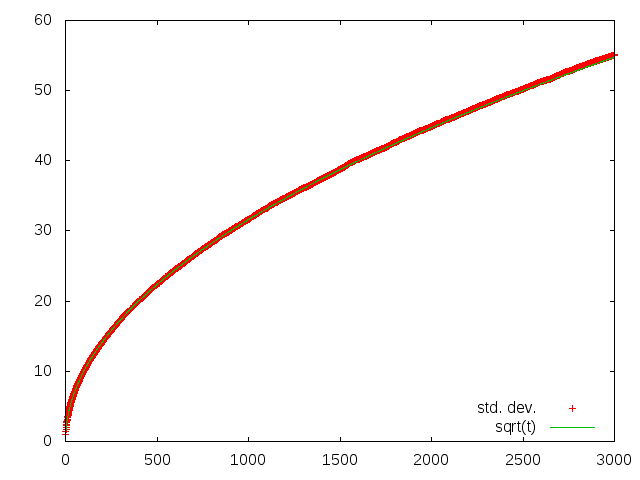
  • but relative uncertainty decreases as sqrt(t)/t suppressing noise
  • distribution histogram approaching Gaussian, very nice illustration of the law of large numbers
Note that imaging has been set to show increasing mean during first animation and reducing relative noise during second animation.


Along with the animations, I computed mean and standard deviation of rain. The results are in graph. The standard deviation is perfectly fitted by square root. One is excellent demonstration of the important property of Poisson distribution.

2011-03-04

Barnard star constantly in motion

Just next short update to those posts Barnard in time and Continuous motion of Barnard's star.


Animation of proper motion of Barnard star.


Track of Barnard star since 2001.


2010-10-17

Coloring release

Munipack development notes


Version naming

I had introduced new naming schema for releases. The naming will be inspired by the crucial development feature.

Naming of the current release is emphasizing development of color handling utilities (coloring, color tuning, color space conversions, etc.).


Release period

Last stable release has been issued on 2010, February.
I think the period is really very long.
The current release does not includes color related features,
but many other important improvements. Namely,
one offers a new command-line interface. So the issue naming would be also
like "commander release", "general failure".;)

In addition, I forget many details developed half year ago, of course.

Also many crash reports (via build-in dialog) are due to errors in binary release which I fixed months ago. So it would be more useful to issue binary releases more frequently. In ideal case, one will immediately follow implementation of an important feature development.


Homepage design

I had modernized a schematic design of the homepage. CSS has been extensively used. The design is probably inspired by the design of guide for MS Fortran Powerstation 1994 edition. By my memories.

Also I tried to apply the rules used in classical typography to Web. The detailed application is not possible, but many rules can be simple used. The most visible is limiting number of characters in a single line on 80 characters. It may look little bit uncommonly, but I think the reading is more comfortable.

I've worry about use of float elements (tables and images) in a Web page, which ugly breaks text flow. On the other side, the placement of all the elements on bottom or on separate pages is more disturbing. I'm expecting some progress in future.

The interesting navigation's post about typography (but no idea but from the examples has been used).

I had try to use rules:
  • book-like design
  • column width of 80 characters
  • column width of 80 characters
  • minimized number of used fonts
XML serialization

When I implemented the archive and DND functions, I developed a XML serialization of FITS header, structure and thumbnail data (contents of ~/Munipack). The concept is partially similar to VO table format. The XML files (including thumbnails in png) can be easy pushed over tcp sockets, streams etc.

Sub-processes

This release is also proof of concept for invocation of external binaries within GUI session. The GUI is a controller (GUI wrapper) for the binaries. All working utilities (conversion of raw pictures, coloring, dark, flat averages and corrections) are implemented as sub-processes of GUI (via wxExec function, which is probably just only wrapper of exec(3) family functions under unix).

This concept separates GUI and working parts. Also importantly reduces complexity of full package. The utilities communicates via standard input/output. Therefore, there is a wide flexibility in replacing of required subroutines. Also it would be easy to use of the utilities under another environment (Web, etc).

The successful prove of the concept is probably the most important experience of this release.

Plplot

All plotting has been rewrote to use plplot library. This is just preparation for a more power-full plotting tools.


Displaying improvements

In previous release, images has been rendered by passing of every pixel to routines as single argument. The way looks slow. The rendering needs call of two or more functions (tone + color) which may be slow (in order of percent). More important aspect is display in progress. The extensive calling of events for every pixel to indicate progress is very bad idea. Therefore images was displayed when full frame rendering was completed. That may be stressed for user, which expect results immediately.

Therefore, I rewrote displaying in progress to tiling. The image is split-ted on tiles with suitable 137x137 (fine structure constant) pixels. Hence, rendering function works on whole array (not on single pixels). The rendering results can be displayed continuously (only a few events will usually needs) which is more comfortable for user. The rendering naively simulates a progress bar.

Another improvements is pre-scaling of images. One leads to rendering already scaled image. It importantly speed-up tuning of large pictures.

The speed for normal size gray images is satisfactory. Commonly, eye does not recognize any blinking (flickering). The rendering times are usually under 0.2 sec. Unfortunately, the tiling is clearly visible on color images because transformations are more expensive. Rendering may take seconds.


New installer

The most visible change is use of ESP package manager which provides graphical installer similar to widely known installers of Windows or Mac OS worlds. The installation is pretty straightforward. All files are installed to /opt. There is no possibility to change the place.

By the way, the google-chrome deb package installer does the same job. It is designed to unpack a set of binaries to /opt. The installer also create appropriate links to binaries and run xdg tools to add google-chrome to the global menu and desktop.

The graphical installer does not offers ideal way to install when package system is available. In future, it would be better distribute binary packages (deb,rpm?) as well as.

EPM installer (setup) has included fltk library. Also needs some binary libraries (in proper version number!) included in system (png, jpg and X-libs). Is there a way how to link its statically?


Binary bundle

I spend very long time with developing of a new build script.
The script is relative solid and easy to use. So the generation
of a new binary release binaries will not too bother to me.
See dist/builder.sh.

The linux packaging systems (deb, rpm,... packages)
are really great ones. Unfortunately, there is really many
linux distribution and combination of various libraries
and tools. Distribution of third-party tools is really big
strange not satisfactory solved yet.

The crucial point is library dependency. Theirs placing and presence
is important for run. The library mutual cyclic dependencies can
cause big problems for binary distribution.

So, I has choose the way for the distribution:
  • All files are placed to /opt/munipack. The hard-coded installation directory is required by EPM.
  • The distribution includes libraries out of typical distribution set (wxWidgets and plplot). The libraries also would correctly set compilation options and versions.
  • Some binaries (and .so libraries) sets rpath. Usually the rpath is hard-coded during compilation. The path is different from installation path. Therefore, I replace the rpath by patchelf utility (see http://www.eyrie.org/~eagle/notes/rpath.html).
  • The distribution script is dist/builder.sh

2010-03-04

Continuous motion of Barnard's star

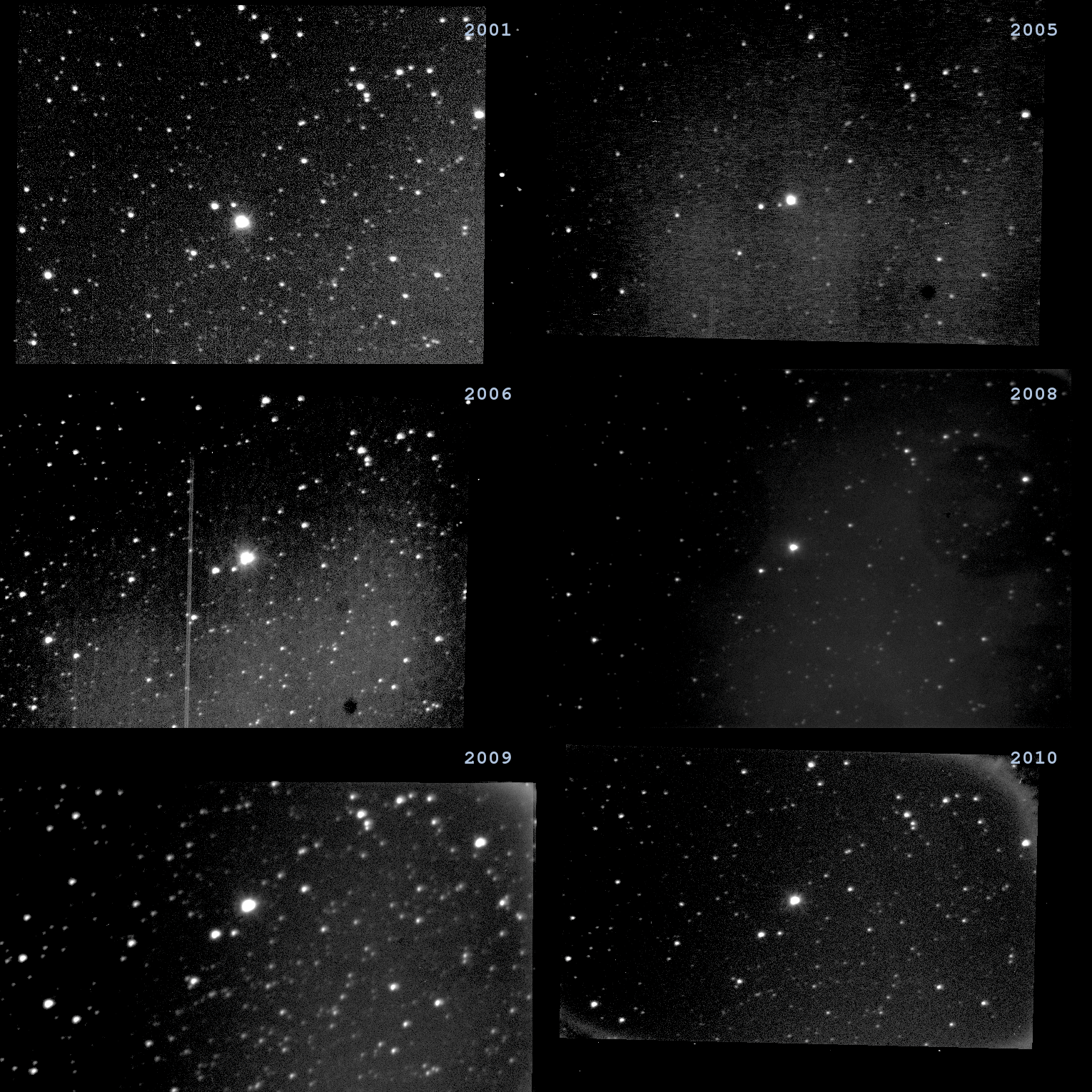
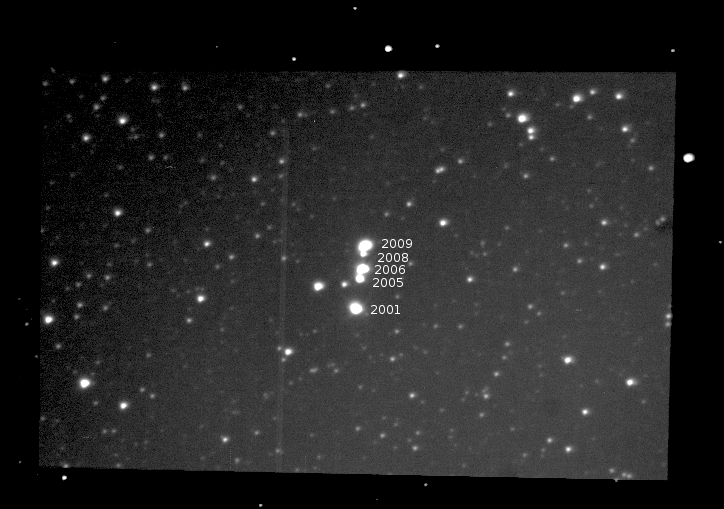
Some time ago, I published the article about visualising of the proper motion of Barnard's star. Now, I had added images of next two years. As we are expecting, the position of the object is nicely predictable.

The last two images (years 2008,2009) are taken during autumns opposite to solstice's images at 2005,2006. Any shift due to parallax is not visible. Simbad gives value for parallax about 0.5" which can be visible with our instruments. By my opinion, when we will more carefully selecting time between exposures.

Barnard's star images has no unique brightnes due to different observing conditions.


Barnard's star motion between 2001 and 2009. Full field of view.

2010-02-11

A Graphical User Interface for Munipack

I had started work on the graphical user interface (GUI) for Munipack year ago. The issue of a first public experimental version including the GUI is ready for downloading. Thus, I think the time to resume of my selected skills with the GUI development is coming now.

Why GUI?

Steps towards development of GUI ripened inside me for a long time. The last story which rouse me was processing of large data sets of images from our digital camera. I scaled by manual way its intensities which was produced a very long sequence of commands with fine-tuning options.

Screenshot of my older terminal

Other reasons:
  • simple complex visual manipulation with FITSes
  • processing of astronomical data by my students during migrating from another platforms
  • it is really shame that we have not a simple astronomical data manipulation tool in 21. century
  • command line utilities needs a lot of experiences to work with
  • I want save my skills with data processing (any kind of description is not satisfactory with respect to a dynamic actions, a white paper is not a way).
  • More simple and interactive way of operations on images.
Not all the aims are included in current versions, but they are planned.

Inspirations

I started work with long time experiences of using ds9 and Gaia. Both are my personal favorites. Unfortunately, both does not fully supports my needs and also the reasons above. Initially, I started work on GUI as a modernized copy of ds9. Lately, I abandoned the way but many of features introduced by the tools are presented.

As a first step, I coded Help window as a simple copy of Gnome's Epiphany browser which can be used to display on-line help. Epiphany was one from first clear designed web browsers.

A help (large)

The Browser window with thumbnails is similar to another Gnome's utility - Nautilus, the file browser.

A browser (large)

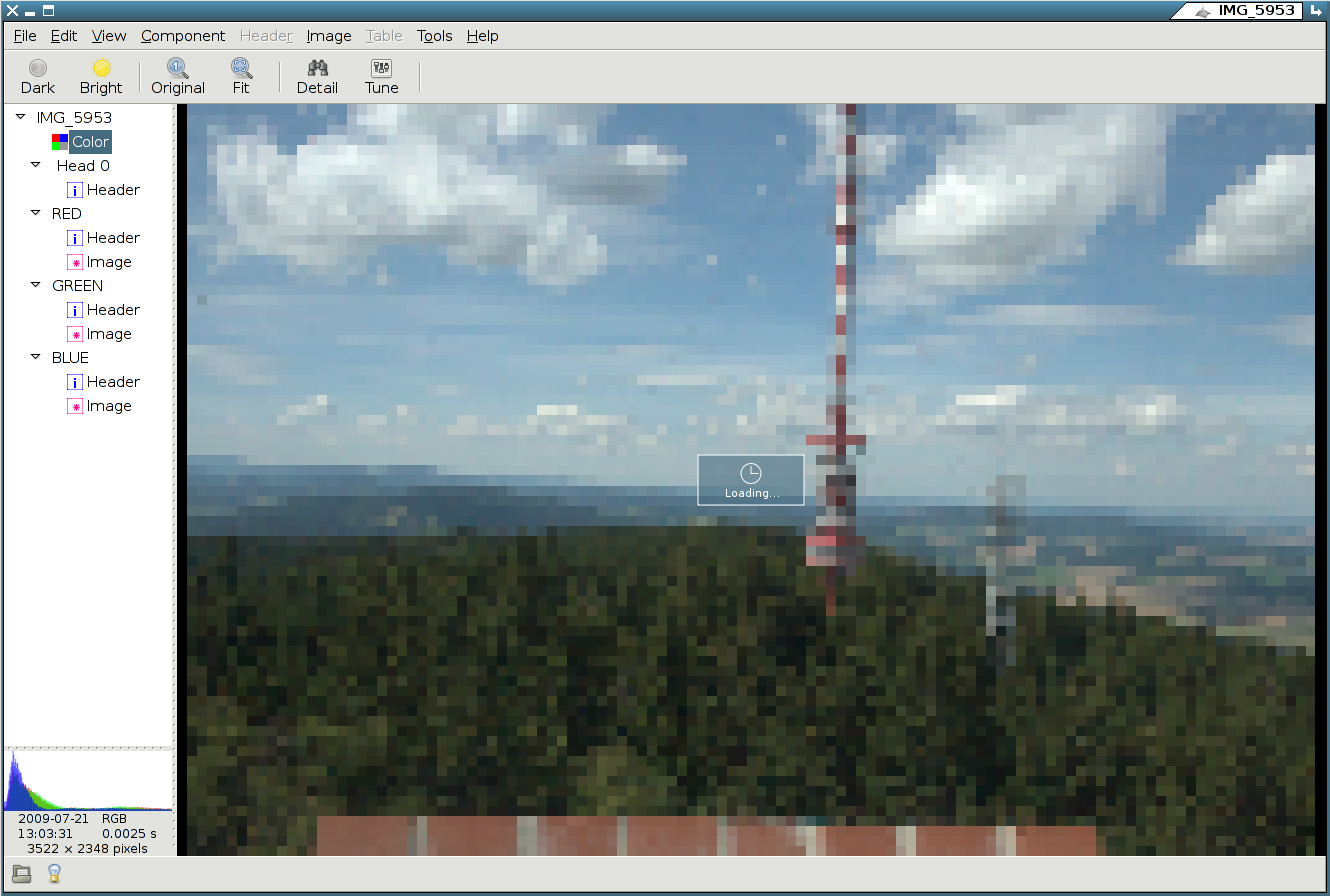
The dynamical behavior during image rendering/loading is similar to iPhoto. The load of large images can take many seconds and user is confused when see only a blinded menus or controls. So I used the hook: Firstly display appropriately scaled icon and display a rendered image later. This gives effect of "working application" without confusing of its user.

A view during loading (large)

The design

I designed GUI practically randomly in early phases. A lot of features I'd take from ds9 or Gaia. After some period of frequent redesigning, I found the document Apple Human Interface Guidelines and afterward I cleared concept. By my opinion, the chapter Characteristics of Great Software is on base of work and ideas of Jef Raskin.

The key principles:
  • Keep everything simple as possible.
  • Don't distract the user from his/her ideas which working on.
  • The user is not a programmer. It is expert in astronomy and I is not (not want to be) an expert in programming.
See J.Raskin's rules.

In astronomical processing, the user thinking in absolutely different working framework or technical terms (for example: spectral distribution, black holes, fluxes) than a programmer. So I tried design the GUI in that way. For example, a FITS file is displayed as a tree structure similar with single parts representing every HDUs. User can easy show info about image as well as image itself.

Don't expect that the GUI will cover all functionality of command line utilities.

The programming language selection

The code of Munipack has been developed in Fortran up today. I used Fortran 77 in early days, but now is everything except munimatch coded in Fortran 90. Unfortunately, there is no graphical toolkit for Fortran.

I selected C++ after forethought. The C only is too primitive and too difficult for GUI programming. The Pascal or Ada has poor support of libraries. Go looks attractively (is like C++ with garbage collector) but is not matured yet and also has no support for graphical toolkit.

I abandoned Java, Python, Ruby, etc. for theirs very slow run and needs of a virtual machine. Also, I can not hustle users for installing some additional exotic virtual machines when they have running CPUs. By my opinion, it is very bad idea to write a image processing utility in interpreted language. The counterargument that the development is more fast is fake. I spend approximate same time while developing in Python and C++ under wxWidgets.

Also, theirs run-time speed is important. All interpreters are slow, really slow. The pull of menu is a great action spending many seconds.:) The replace of sub-elements in a window induces a pause for cup of coffee.:) But users have no time. User wants to see their results immediately. The one is less important in GUI elements but it is really important while displaying of large images. The image must be recomputed (rendered) before every displaying.
The operation must be done on CPU because I have not found a way how to done it onto a graphical card (if there is the way, I think OpenGL specification doesn't supports my needs). To illustrate the computations , please try code with loop over 1000x1000 pixels with a simple operation like sum of two real numbers in various languages. I got: C++ under 0.1 sec, Java, Python a few seconds. Because the operations are done very frequently the interpreted languages are unusable for me.

The toolkit

Alternatives for graphical toolkit:
  • Gtk+ - With Gtkmm+ may be useful. But relative rapid development and non-platform looks doesn't fit my needs.
  • Qt - controversial license. Development depends on one company. Unaesthetic look.
  • GnuStep - Very attractive alternative witch offers look, control and behavior like Mac OS X. Moreover it is programmed in Objective-C. Unfortunately, graphical look under Linux is like one from the past.
All others are unmatured and too simple (Fltk, fox, ..) or they are in too many retro-style (Motif, Athena ..).

Finally, I selected wxWidgets. The toolkit offers many amazing features.
Two crucial features for me:
  • Portable (multiplatform). It can be run under many possible environments including Unix, Mac OS X, Windows, smart phones.. The library is as the unified layer between portable code (developed by my) and a native toolkit. Impressive! So it looks as a native application. Many additional features like portable configuration support, filesystem managements and many more helpers are implemented.
  • Memory management. wxWidgets has two approaches to memory management. Graphical widgets (like windows, controls, dialog.. elements..) are created as pointers and destroyed by the library itself so memory management is done by library itself. Second way is implementation of reference-counting into library core. Therefore all my data I'm using as reference (not pointers) without risk of memory leaks. Both techniques practically does a kind of automatic garbage collector. The memory is checked via valgrind.
The GUI core

I spend a large working time with:
  • design and implementation of FITS representation on the top of cFITSIO. I developed a set of C++ classes as representation of a general FITS file. The implementation can be used as a simple library for cFITSIO. CCFits library does not fit my needs.
  • I'm using two sets of classes. First represents a original FITS file and the structure is fully used in View window. Second represents a FITS meta object containing only headers and icons without memory consuming bitmaps or tables. The structure is used in Browser window.
  • GUI design (see rest of the post).
  • Any interaction between different windows controls is implemented by all modern window systems via events. Unfortunately, the implementation is very primitive. Single object sends events to another specified object but it is very difficult to sent the signal to various objects, gets a response and vice versa. The basic idiom used in this context is model view-control. I'm using some ideas of its for displaying of images. But I developed it by little another way and independently.
  • Using of threads. One from big problems when I solved. The windowing system runs handlers for prepared actions without interruption. If any action takes longer periods (over 0.7 sec) user can see that the application hangups. This is very confusing behavior. The right way, how to solve, is via independent threads. The application responses very quickly and it pleasure for use when threads are used. It is very nice when more than one CPU (or core) is installed. Than both threads can run on different CPUs to importantly speed up the application.

During hungup (large)

The GUI design

I choose untypical (with respect to ds9 or Gaia) layout as result on many experiments. The View window is divided onto two pars. The left is a control panel where a structure and additional info (histogram, size) of FITS is displayed and the right is for displaying of a contents. The window can show all images, tables and header.

The geometry is ideal for modern monitors (commonly in 16:9 format, Xerox Alto computers are very rare to meet today) when a maximal area of image can be displayed without compromises. The left part is near of other controls (menu or toolbar) to meet a right ergonomy (my personal preference is the close button on the left).

Two important improvements over the ds9 and Gaia are included:
  • The image is fitted on the size during load (like iPhoto's). This speed up loading of large images and also the image is completely and perfectly prepared for a quick inspection.
  • The image is automatically scaled in intensity. The user probably will see mostly details on the image.
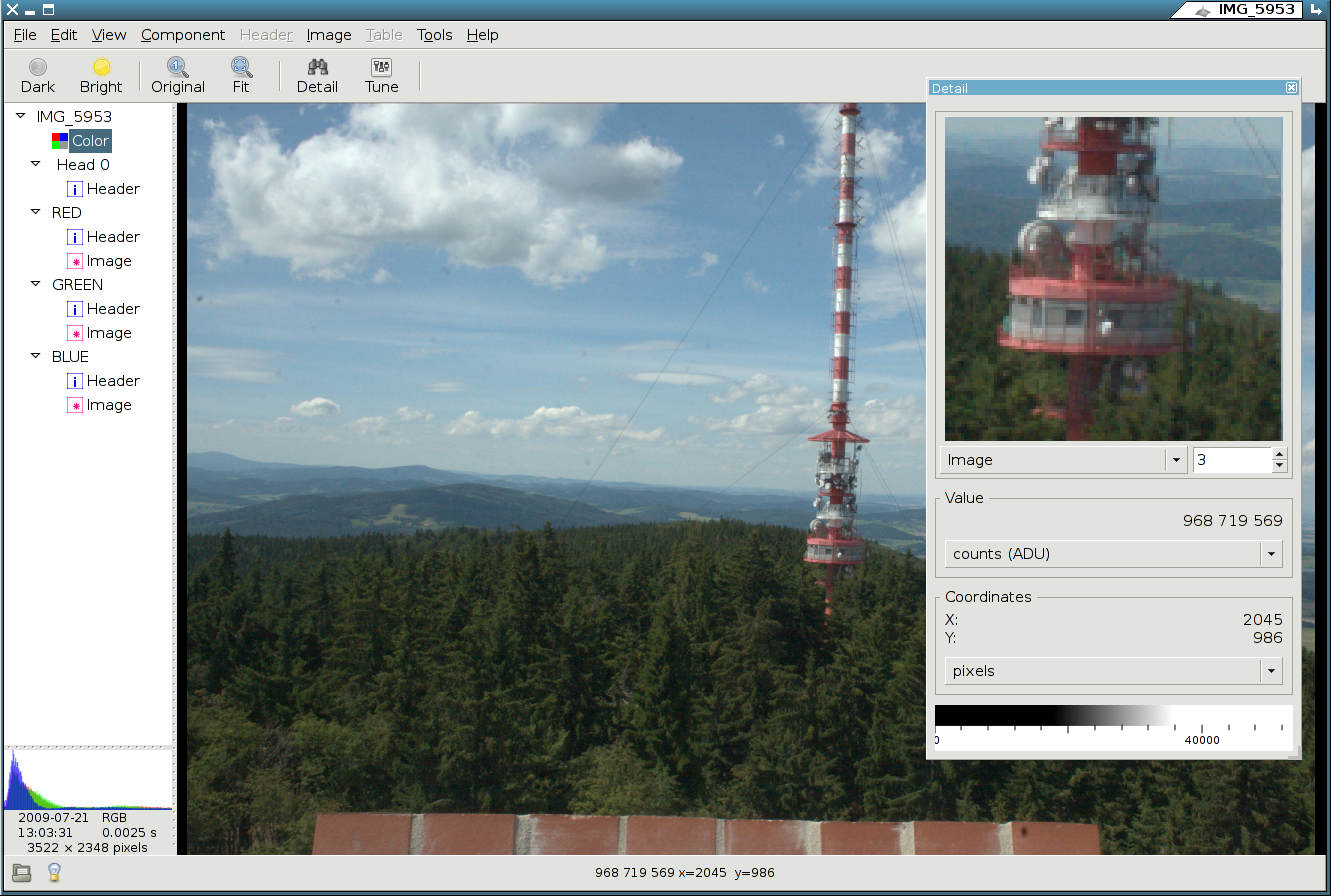
Some controversy can be creating of separated windows for tuning and detail view. Many peoples don't like the behavior. I checked both alternatives, the dialogs included in tabs in control area and the separated windows. Perhaps, the including is too restricting. The windows has limited space so you can't freely move or size windows. The layout and labels must fit the space. You can't have opened both windows together etc. A useful discussion can clarify the layout.

A detail (large)

Bugs

The current version is relative stable but it was not tested on wide range of software configurations or operating systems. Therefore I expecting a lot of bugs to fix.

The are two channels to report any bugs:
  • The issue tracker under Google code. You must have OpenID account to use it. You can also use the tracker to request of new features.
  • When application crashes, the application shows an dialog with a log which can be used to directly report to my ftp server. The log can contain some private information. Please check directly that the info can be read be me and when you will accept to pass a (really) small info about your configuration, please send the report.

A crash report

You are also welcomed to Munipack's Google groups where you can report bugs or discuss more detaily other aspect of Munipack and the astronomical processing.

Discover of a New World

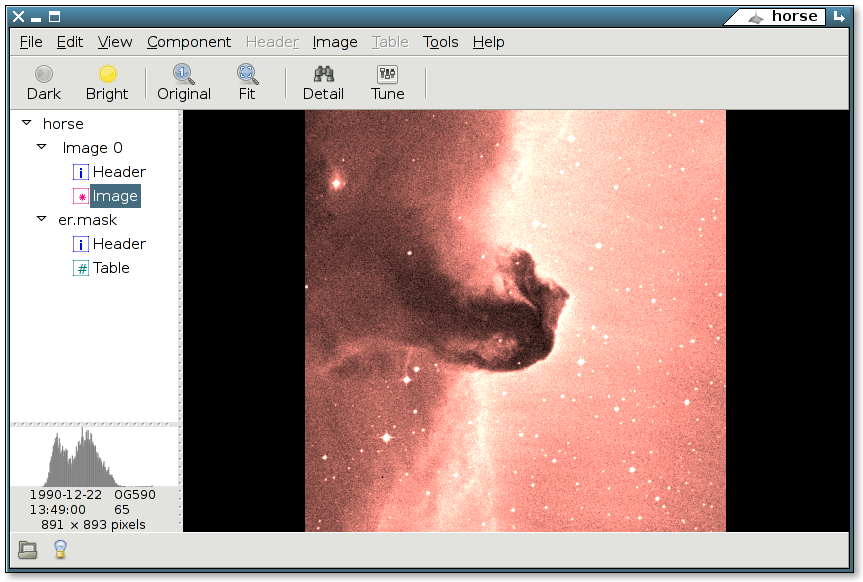
The detailed structure of FITS files reveals a new world for me. With help of the one, many FITSes shows unexpected additional features. Do you know that DSS images has two parts? The use of the parts is trivial not a complicated. The structure of FITS is displayed as an integral part of FITS world so users are not surprised by the complicated structure. Especially, it is important during inspection of any unknown file.

Horse nebula (large)

Unimplemented features
  • List mode (don't show icons, show table with files) in Browser. It is probably useless, because thumbnails are not visible. I'm hesitating with its support.
  • Orthogonal intensity scaling. The well behaving applications has orthogonal controls. That means, that when one tune a quantity, other quantities are not affected. Unfortunately, the intensity scaling in not implemented orthogonally. The image is brighter of darker by using of both sliders. I have no idea how orthogonalise it.
Please, keep in mind that everything can be changed.

2010-01-15

Astrometry Calibration

I added experimental support for astrometry to Munipack. It is primary designed for astrometry on CCD. So only gnomonical projection and affine transformation (shift and rotation) are supported yet. Both limitation can be freed in future releases.

The astrometry code is available in GoogleCode now.

The algorithm

I coded my own implementation of the widely-known "Astrography plate
measurement" (Smart & Green, Tagg).

On input:
The table with Right Ascension,Declination (from any catalogue) and corresponding measured rectangular x and y coordinates for every object.

The algorithm:
  1. Get center of a picture in pixels as half of both sizes.
  2. Estimate a center of projection in spherical coordinates by mean.
  3. Project spherical coordinates to rectangular ones.
  4. Estimate scale as mean ratio between distances of projected and measured distances of objects.
  5. Estimate angle of rotation between projected and measured coordinates by using of property of scalar product of vectors.
  6. Compute the transformation by some minimization method with starting values given by items 3,4 and 5.
  7. Check offsets between center of projected and measured coordinates. If one is too great, does better estimate of the center of projection and repeat from item 2, else finish.
On output:
Precise coordinates of center of projection, scale and position angle of image. Optionally, statistical parameters.

The described algorithm is relative general, so it can be easy modifies for another projections or more complex transformations of rectangular coordinates like distortions, pincushion, etc.

The algorithm is iterative due to fact that we need known the center of projection before we have calibrated image. Usually, only tree iterations are required.

The Robust Algorithm

The real-world usable algorithm needs to be robust. Small deviations can cause only small variances in output parameters. Outliners has only small fluency on the solution. The simple example of the use of robust method can be found in Launer & Wilkinson: Robustness in statistics: proceedings of a workshop (1979) or in Numerical Recipes. Munipack implements robust mean estimator in lib/statistics.f90 as rmean. Another use of the robust algorithm is on straight light fitting.

I applied the basic schema of robust algorithms to the above algorithm:
  1. Estimate median of absolute deviations (MAD) using of minimization of absolute deviation (Nelder-Mead).
  2. Use method of maximal likelihood to estimate the proper transformation.
Astrometry implements module in astrometry/astrometry.f90. The estimation of MAD is loop around nelmin. The maximum likelihood is loop around Minpack's hybrd.

The fitting is decomposed on tree single steps (estimate of center of projection, scale and affine transformation) so we works in parameter sub-spaces (we are not fitting all the parameters together). Numerical experiments gives me more robust behavior and more precise solutions than simultaneous fitting of all parameters. By my opinion, it is results of (non-)ignoring of their cross-correlations. It is interesting that QR decomposition does not solve the problem.

The algorithm is optimized on precision not on speed. So for a lot of objects may be slow.

The Low Precision Algorithm

The robust algorithm can be used only for many object (ideally for tens of stars and more). The absolute minimum is five stars. I'm supposing that sometimes will be required astrometry for less stars. In this case, I'm switching to a simple algorithm which uses median only to estimate of required parameters.

For two stars, the transformation can be determined, but is is not possible to estimate uncertainties of parameters. It is not possible to estimate scale or rotation for only single star.

Input/Output "protocols"

I choose an unusual way to set an input and get an output data. The stream input is a text file consists a set of lines (records) with the same structure as FITS headers. By the user point of view, the routine performs as a transformation filter. The text file on input is modified by replacing and adding new lines to the output text file.

The output structure is perfectly suitable to be directly writable to a FITS header in standard WCS format. We need an external utility to merge of the output lines to an existing FITS file. Munipack provides munifits tool for the task.

It is possible to add another type of output, but I think, there is no other widely used standard astrometric format. If the way will successful, I'll reimplement it for remaining utilities of Munipack.

The style can be little bit strange but absolutely the same as standard e-mail handling. An user interface (Thunderbird, elm, ..) creates well formatted input file and pass it to a SMTP daemon. The daemon (or its successors) delivers its (as copying filter) to a recipient and some client decode its. Note that many Unix utilities uses the same idioms (sed, awk,...). The main advantage of the style is a simple modification of format, also back and forward compatibility. [http://catb.org/~esr/writings/taoup/].

The protocol is in detail described in included manual page and test example.

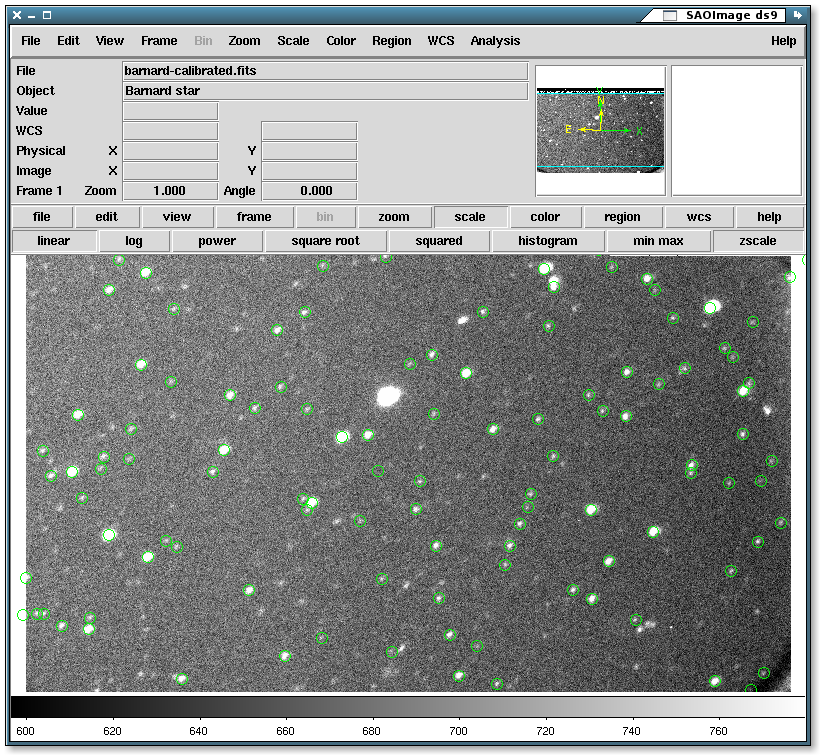
An example of calibrated image with UCAC2 displayed stars. Thx. Mr. Pavel. Large size.